Bonza Chatbot Review: Key Features & Pricing
The chat experience in Bonza Chat is designed around conversational flow rather than prompt-based interaction. Messages connect over time, allowing discussions to evolve naturally.
Users are given room to explore personal reflections, imaginative roleplay, or abstract ideas without the conversation being repeatedly redirected or constrained.
Unfiltered Chat with AI Girls Spicy AI Chatting Your Dream AI Girlfriend Chat ⚡️ TRENDING CHATBOTS ⚡️
Candy AI

Photos and voice messages
Video GenerationMydreamcompanion

Text and Voice Messages
AI Girlfriend that sends picturesPromptchan

Realistic and Beautiful AI Girls
Generate Hot Videos
How it works
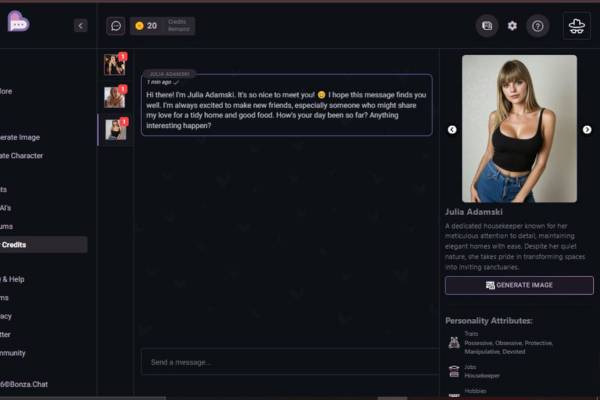
Alright. Now, Bonza Chat is relatively simple to use. The interface is divided into three main sections, and they are all used to get you into a chat.
- Choose a character on the left The very left section is a sidebar with small character icons. Each icon represents a different character. You can select a character, and the character’s chat will open in the middle section.
- Get the character’s intro Once you clicked a character, you will see a chat interface in the middle section. Most characters will send you a message to introduce themselves immediately. In my screenshot, the character Julia Adamski already sent me a greeting.
- Write into the input box below Once you opened a chat, you will see a text input field below the chat interface, probably labeled with something like “Send a message…” This is the input field where you enter your messages. Click on this field, enter your message and hit Enter or the send button to send it.
- Chat as usual Once you send your first message, the AI will respond in the same chat interface in the middle. You can keep on typing into the same input field to chat as long as you like.
- Optionally, look at the right panel The right panel shows you more details about the selected character. There is a description and some character traits. Furthermore, there is a “Generate Image” button which seems to generate more images of the selected character, if you are interested.
Select a character, write into the input field, click send, done.
🔥 Best Uncensored Chatbot: Candy AI

Bonza Chat Subscription and Usage Costs
Instead of charging everyone the same monthly price, Bonza Chat adjusts pricing based on how intensively it’s used. New users are often allowed a small set of free exchanges to evaluate the chatbot’s tone and behavior.
As demand increases, paid access unlocks longer playtime, larger message limits, or smoother performance. The result is low-risk entry with optional expansion for heavier use.
How to Log In to Bonza Chat: Step by Step Guide
Follow the steps below to access your Bonza Chat account:
- Start by visiting the official website or launching the Bonza Chat app.
- Open the site in your browser (Chrome, Firefox, Safari). If the app was previously installed, clear the cache and data before using it again on Telegram. Make sure you log out first.
- Locate the login option: Look for a “Log In” or “Sign Up” button, usually positioned at the top corner of the screen.
- Enter your details: Provide the email and password you used when creating the account.
Best Bonza Chat Alternatives to Consider
Usage limits, restricted functionality, and increasing subscription costs often lead users to consider other AI Uncensored Chatbot platforms.
Some also prioritize environments that allow wider creative freedom. When evaluating pricing, available editing tools, and moderation standards, alternative approaches to AI Chat become apparent. These options generally emphasize adaptability and open access.
What is your reaction?